June 16, 2026
|
5 min read
Top No-Download, Browser-Based Proctoring Tools
This blog post compares the leading no-download, browser-based proctoring platforms across key criteria - device compatibility, AI cheating detection, privacy design, and implementation friction - making the case that Integrity Advocate stands apart by including human review at every pricing tier as a standard feature, not an add-on.


Before a single question is answered, your proctoring platform has already made an impression.
Some no-download proctoring tools get out of the way entirely. Open a browser, click a link, begin. Others require a software download, a browser extension, or a system-level install before an exam can begin.
That distinction matters more than most buyers realize. The install prompt is not a minor inconvenience. It is a compatibility risk, a support burden, a privacy exposure, and the first signal your learners receive about what this experience is going to feel like. We have seen programs lose candidates before the exam starts simply because an install failed on a managed device, a browser was unsupported, or a permission prompt could not be resolved in time.
For programs where results carry real consequences, the no-download question also raises a harder one: if getting into the exam is this complicated, how confident are you in what the platform is doing once they are inside?
This guide covers what no-download, browser-based proctoring actually means, where the leading platforms differ on the criteria that determine whether outcomes hold up, and how to find the right fit for your program, whether you run a university course, a professional certification, a workforce training program, or a compliance assessment.
What browser-based actually means, and what it does not
A genuinely no-download platform runs entirely within a standard browser session. No extension to install before the exam. No lockdown browser to download. No system-level permissions that extend beyond what proctoring actually requires. A learner opens a link and begins, on any device, any browser, anywhere.
Several platforms in this comparison approach the no-download question differently. Some require a Chrome extension added before the exam, which means the platform runs within Chrome specifically. Others use a dedicated secure browser that candidates download and install. Understanding which category a platform falls into matters for programs with diverse device environments, distributed learner populations, or managed corporate devices where installs require IT authorization.
The no-download question is not about convenience. It is about whether your platform works for the full range of people who need to take your assessments, including field workers on tablets, employees on managed corporate laptops, and learners who are not sitting at a desktop in a controlled environment.
The four criteria that matter
Getting learners into the exam without friction is necessary. It is not sufficient. The platforms in this comparison were evaluated across four dimensions that determine whether results are worth standing behind:
How the leading platforms compare
Not every platform marketed as browser-based delivers the same experience, or the same level of confidence in outcomes. Here is how the leading tools compare across the criteria that determine whether results are fair, trustworthy, and defensible.
1. Integrity Advocate
Integrity Advocate is a fully browser-based proctoring platform with no download, no extension, and no install required. It runs on any device and browser, integrates with any LMS, and is built around a privacy-first architecture that collects only what is necessary to protect assessment integrity. Zero data breaches in over 12 years of operation.
What sets Integrity Advocate apart from every other platform in this space: human review is included at every pricing tier by default. Every flagged session is reviewed by a trained person before any decision is made. That is not a premium add-on. It is the standard. The result is outcomes that are not just automated flags – they are documented, reasoned judgments that hold up to scrutiny and in audits.
G2 #1 Ease of Use. 98% client retention. Fair, trustworthy, and defensible by design.
Side-by-side comparison
Based on publicly available documentation, G2 reviews, and vendor-published feature listings. Features subject to change.
The bottom line
No-download access gets learners in. What happens once the exam is underway is what determines whether results can be trusted.
Most platforms rely on AI-based flagging, algorithms that surface alerts without human judgment applied to them. A flag is not a decision. When a result gets questioned, you need something more than an algorithm to back it up.
Integrity Advocate puts a trained reviewer behind every flagged session before any outcome is issued. That human review layer is not a premium tier, it is built into every plan, for every program. The result is not just a monitored exam. It is a documented, reasoned judgment that holds up in audits and under appeal.
That is why 98% of Integrity Advocate clients stay. Not because switching is hard. Because the outcomes are worth keeping.
{{post-cta}}
Keep reading

Top Proctoring Tools in 2026, Ranked by What Actually Matters
April 6, 2026
|
5 min read
Not sure which proctoring tool fits your program? This guide compares the top 10 platforms of 2026, breaks down the three proctoring models, and shares the one vendor question that determines what your results are actually worth.
The market for best online proctoring tools has grown fast, and so has the noise around it. The global online proctoring market is projected to grow from $700 million in 2023 to over $2.1 billion by 2030. Remote learning is standard. AI-assisted cheating is a real and growing threat. And programs across education, credentialing, and workforce training are under more pressure than ever to issue results that are trusted, accurate, and defensible.
In many ways, the tools have kept up with that growth. But not all of them have kept up in the right ways. Some have leaned hard into automation at the expense of fairness. Others have added AI features without answering the question programs actually need answered: when a result is challenged, can you stand behind it?
The market has largely framed this as a choice. Speed and scale on one side. Human judgment and defensibility on the other. What most programs actually need is both, without having to trade one for the other. That is what this list is really about.
What to Evaluate Before You Look at a Single Tool
Feature lists are easy to produce. What matters is whether a platform solves the problems that actually cost programs time, money, and credibility. Here is the framework worth using:
Can you defend a result?
When a flagged incident leads to a consequence, someone will ask how that decision was made. AI alone cannot answer that question in a way that holds up to scrutiny. You need a documented human review trail. Not an algorithm output. A process.
Is privacy built in or bolted on?
Data privacy requirements are not going away. FERPA, GDPR, and emerging state-level frameworks all affect how proctoring data can be collected, stored, and used. Platforms that treat privacy as a compliance checkbox are a liability. The ones built around data minimization from the ground up are not.
Does the experience reflect well on your program?
Proctoring that feels invasive or surveillance-heavy creates friction, complaints, anxiety, and lower completion rates. The process should feel fair to the person going through it. When it does, you get fewer disputes and better outcomes.
Who supports your program beyond kickoff?
Implementation support, responsive account management, and an onboarding process that actually works. Client retention rates tell you more than case studies.
Does it cover the full assessment journey?
Identity verification before the exam. Monitoring during it. Clean, documented results after. Gaps in any of those stages are gaps in your program’s integrity.
The Three Proctoring Models
Every tool on this list falls into one of three categories. The model matters as much as the features.
Top 10 Online Proctoring Tools in 2026
1. Integrity Advocate
Best for: Education, professional certification, and any program where results need to be defensible.
Integrity Advocate is built on one principle. Every AI flag is reviewed by a real person before it becomes an outcome. Not as an add-on. Not a premium tier. That is how the platform works, for every client, on every exam. AI identifies. Humans verify. Your program gets results that are fair, accurate, and built to hold up.
The platform is browser-based and requires no installation on student devices. No downloads, no extensions, no IT bottleneck. It works across any device, browser, and LMS, including Chromebooks. Test takers show up and take the exam.
Privacy is built into the architecture from the ground up. No unnecessary data storage, no invasive browser installs, and zero data breaches across more than 12 years of operation. That is not a claim. It is a record.
Coverage spans the full assessment lifecycle. Identity verification, exam monitoring, human review, and credential delivery through the Accredible integration all run on one platform with no gaps between stages.
With a 98 percent client retention rate, the relationship Integrity Advocate builds with programs is a meaningful part of the value. Programs stay because the relationship works, not just the technology.
Key strengths Mandatory human review on every flag, privacy by design, zero breaches in 12 years no install, works on any device or LMS, full assessment journey coverage, 98% client retention
2. ProctorU (Meazure Learning)
Best for: High-stakes certification and licensing exams.
ProctorU offers live human proctoring with real-time intervention capability. Strong audit trails and 24/7 scheduling make it a reliable option for high-stakes professional exams. Examity has been folded into this platform. Per-session pricing and scheduling requirements limit scalability for programs running high volumes with flexible timing needs.
3. Proctor360
Best for: Programs that need high environmental security and flexible proctoring configurations.
Proctor360's standout feature is its proprietary 360 Total View headset, which captures a complete view of the testing environment. It supports multiple proctoring modes including AI auto-proctoring, single and multi-camera live, and recorded review. Highly configurable for institutions that want different security levels across different exam types. Integrates with Canvas, Moodle, and Blackboard. Human review availability depends on the configuration and tier selected.
4. Talview
Best for: Large enterprises running high-volume, complex assessments.
Talview has invested significantly in AI capability, including a multi-layer security framework and behavioral analysis tools. It operates across more than 120 countries and handles significant scale. The platform skews toward enterprise hiring and large institutional clients. Mid-market education and certification programs may find it designed for a larger and more complex buyer than their needs require.
5. Honorlock
Best for: Higher education institutions running frequent, mid-stakes exams.
Honorlock combines AI monitoring with on-demand live proctors and is well established in the higher education market. Human review is available but not mandatory on every flagged incident, which means your institution may still be making decisions on contested results. Pricing is competitive for volume.
6. Proctorio
Best for: High-volume, lower-stakes exams where cost is the primary driver.
Fully automated with no human proctors involved. Proctorio tracks eye movement, audio, and keystrokes and delivers a low per-exam cost that makes it accessible at scale. The trade-off, however, is real: flag review is handed back to your institution. If 15 to 20 percent of your exams are flagged and your staff is sorting through them, the savings on the tool may not reflect the actual cost to your program.
7. Respondus (LockDown Browser + Monitor)
Best for: Institutions already embedded in its LMS ecosystem.
Respondus is widely adopted in higher education and functions primarily as a lockdown browser with a monitoring layer. It works best as a deterrent within a broader integrity approach rather than a standalone proctoring solution. There is no live or mandatory human review component, and the platform requires a browser extension on student devices.
8. PSI Bridge
Best for: Government licensing exams.
Enterprise-grade security with strong identity verification and regulatory compliance, built specifically for high-stakes professional and government licensing exams. Well suited to that context and less flexible for mid-market education programs that need a more configurable setup.
9. Proctortrack
Best for: Programs that need tiered options and pricing flexibility.
Proctortrack offers multiple monitoring modes from automated to live, giving institutions flexibility to match oversight levels to exam stakes. Human review availability depends on the tier selected. Evaluate carefully what is and is not included at each pricing level before committing.
10. Mercer Mettl
Best for: Corporate hiring and skills-based assessments.
Mercer Mettl combines psychometric testing with proctoring in one platform and integrates well with HR systems. Built for the recruitment context. Programs in academic or professional certification settings will find it designed for a different buyer and a different workflow.
How the Top Tools Compare
How to Choose the Right Tool for Your Program
The right platform depends on what your program actually needs to protect.
If your exams carry real consequences, certifications, academic credentials, professional licensing, your results need to be auditable. In practice, that requires mandatory human review and a documented process, not an algorithm output. Start there.
If privacy compliance is a growing concern, look for platforms where data minimization is structural, not a feature toggle. Ask vendors specifically what data is stored, for how long, and where. Zero breaches in 12 years is a different answer than a privacy policy page.
If learner experience matters to your completion rates and your program's reputation, choose a tool that requires no installation and has been validated by learners as fair. Those programs see fewer disputes and better outcomes.
If implementation burden is a concern, ask vendors what onboarding actually looks like beyond the kickoff call. Client retention rates tell you more than any case study will.
The Bottom Line
Most proctoring platforms will tell you they deliver trusted results. The question worth asking is how. If the answer is AI monitoring and a flag report, that is a starting point, not a complete answer. The programs that make defensible, fair, and accurate assessment decisions are the ones that pair AI detection with documented human review, protect learner data by design, and work with a platform that treats their program like a partner.
The tools that deliver all three, without asking you to trade one for another, are the ones worth your time.
Results you can
actually stand behind.
Every flag reviewed by a real person. No installs. Zero breaches in 12 years. See how Integrity Advocate works and what it means for your program.


We will show you exactly how it works.

AI vs. Human vs. Hybrid Proctoring: Which Model Best Protects Exam Integrity?
October 9, 2025
|
5 min read
As online testing expands across education, certification, and compliance training, the choice between AI-only, human-only, and hybrid proctoring has real consequences for exam integrity, fairness, and organizational risk. This post breaks down all three models, their pros and cons, and when each is the right fit, concluding that hybrid proctoring delivers the best combination of efficiency, accuracy, and fairness for most modern assessment environments.
The Evolving Landscape of Online Exam Security
As online testing continues to expand across education, certification, and compliance training, choosing the right proctoring model has never been more important.
AI-only tools promise automation and scalability. Human-only options offer fairness and empathy. Hybrid models combine the best of both, but which one truly protects exam integrity?
This article breaks down the three dominant proctoring approaches, their pros and cons, and what to consider when choosing the right fit for your organization.
1. AI-Only Proctoring: Fast, Scalable, and Automated, but Imperfect
AI proctoring tools use algorithms to detect suspicious behavior automatically, from unusual head movements to multiple voices or unauthorized devices.
While these systems offer speed and scalability, they also raise concerns about accuracy and bias.
Pros:
- Monitors large numbers of exams simultaneously
- Automates flagging and reporting
- Reduces administrative workload
Cons:
- High false positive rates (lighting, gaze, or accessibility issues)
- Lacks human context and judgment
- Raises data privacy and fairness concerns
AI-only systems can be efficient but risk misinterpretation, which can reduced trust among test takers.
2. Human-Only Proctoring: Fair and Contextual, but Limited in Scale
Human proctors oversee exams via live or recorded video, making real-time decisions based on context and behavior.
This model prioritizes fairness, empathy, and human oversight, but introduces scalability and scheduling challenges.
Pros:
- Accurate, contextual decision-making
- Builds trust with test takers
- Reduces false flags and misunderstandings
Cons:
- Labor-intensive and difficult to scale globally
- Higher cost per exam
- Limited flexibility for asynchronous or on-demand testing
Human-only proctoring ensures fairness but struggles to keep pace with modern testing needs.
3. Hybrid (AI + Human) Proctoring: The Best of Both Worlds
Hybrid proctoring blends automation and human oversight to deliver accuracy, fairness, and scalability.
AI handles initial detection, while human reviewers verify each flagged event before reports are finalized. This ensures efficiency without sacrificing integrity.
Pros:
- Reduces false positives with human verification
- Scales efficiently across time zones
- Protects privacy and fairness
- Provides auditable, compliant reporting
Cons:
- Requires platform integration
- May introduce slight delays in review turnaround
Hybrid proctoring creates the balance today’s organizations need, efficient technology guided by human discretion.
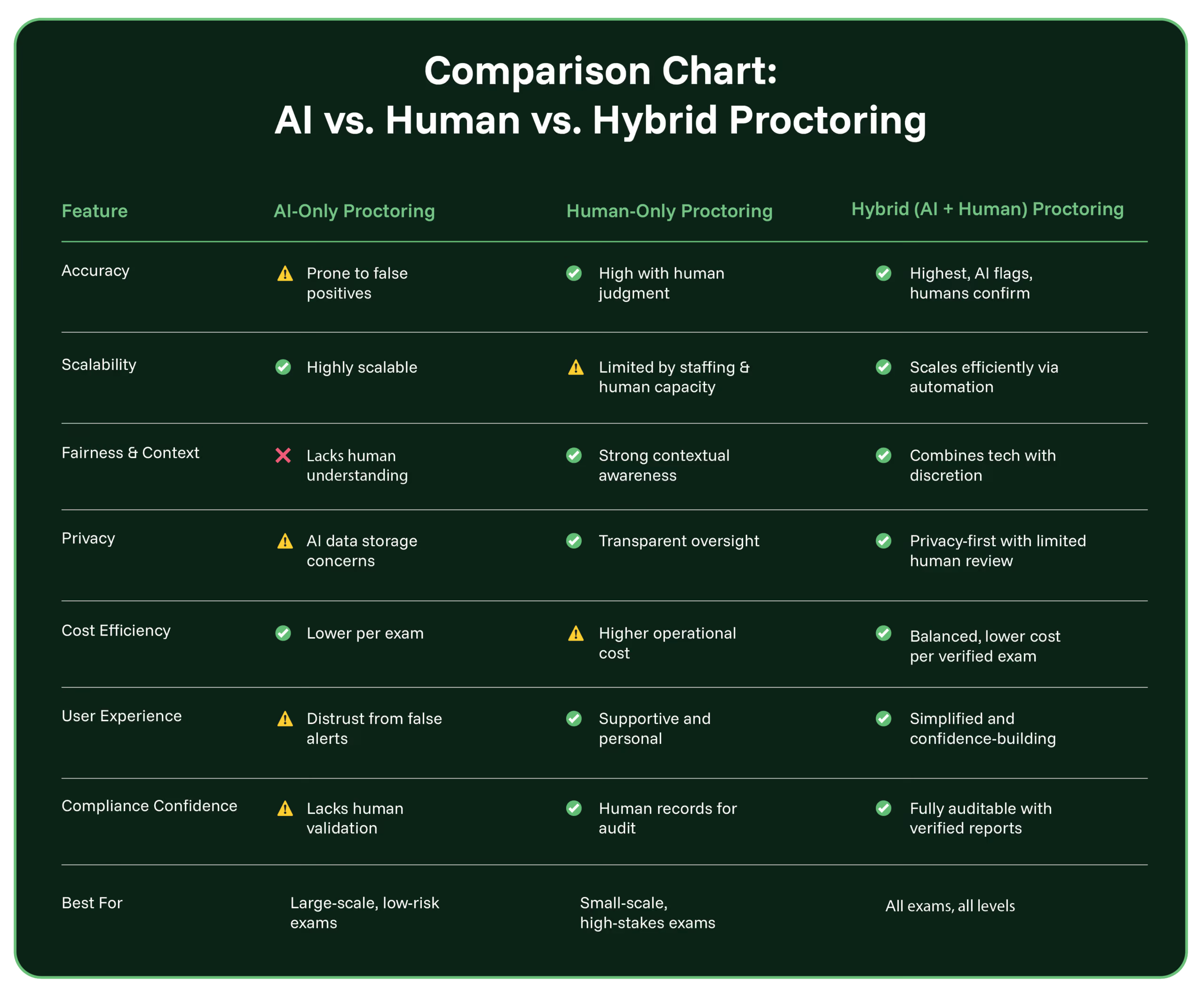
Verdict: Hybrid proctoring delivers the best combination of efficiency, accuracy, and fairness, meeting the evolving needs of modern learning and compliance environments.
When to Use Each Type of Proctoring (and When to Avoid It)
Choosing the right proctoring model isn’t just about features, it’s about fit. Here's when each approach works best, and when it might fall short.
AI-Only Proctoring
AI-only proctoring is a good fit for large-scale, low-stakes testing environments where speed and automation are priorities. It’s ideal for institutions delivering practice exams or formative assessments with minimal impact on final outcomes. If your team is constrained by staffing or budget, and real-time oversight isn’t required, AI-only can offer a fast, lightweight solution.
However, AI-only solutions are risky in high-stakes scenarios like certification, compliance, or licensure exams, especially where fairness, accessibility, and privacy are key concerns. These systems can generate false flags and lack the human context needed to distinguish genuine misconduct from harmless behavior.
Human-Only Proctoring
Human-only proctoring excels in small-group, high-stakes testing scenarios where personal interaction, empathy, and real-time judgment matter most. It's particularly useful for live, synchronous exams or specialized formats like oral exams, interviews, or hands-on assessments. If trust, fairness, and human connection are top priorities, a fully human approach ensures every test-taker is treated with context and care.
That said, this model becomes difficult to scale across large populations or global programs. It also presents challenges for asynchronous testing and tends to be more expensive due to staffing and scheduling demands. Organizations needing rapid turnaround or flexible exam windows may find this model limiting.
Hybrid Proctoring (AI + Human Review)
Hybrid proctoring combines the speed and scalability of AI with the fairness and context of human review, making it ideal for most modern assessment environments. It works especially well for mid- to high-stakes exams delivered at scale, such as workforce certification, compliance training, or higher education finals. Hybrid models support asynchronous access and bring-your-own-device testing, while still delivering human-verified, audit-ready results.
The main limitation is that some hybrid models may involve slight delays between the test and final reporting, depending on review turnaround time.
Why Hybrid Models Are the Future
Organizations are no longer choosing between technology and trust — they’re demanding both. Hybrid proctoring empowers institutions to deliver secure, privacy-compliant, and credible assessments without friction for test takers.
By combining automation and human verification, administrators get:
- Fewer false flags and student disputes
- Stronger audit trails and compliance documentation
- A smoother, more confident test-taking experience
How Integrity Advocate Sets the Standard
Integrity Advocate’s hybrid approach is designed around human-first, privacy-protected verification.
- No software installs required
- Works on any device or browser
- AI-driven detection verified by expert human reviewers
- Transparent, auditable reports administrators can trust
Integrity Advocate’s hybrid proctoring ensures fairness, compliance, and confidence in every assessment.
“Integrity Advocate integrates easily with our current system. It runs smoothly and is aesthetically pleasing; it meets the high standard we have for all our systems. It is also very effective at proctoring while not being too invasive; our users feel comfortable using it. Integrity Advocate strikes the right balance of integrity and privacy, which is hard to find!”
Ready to find the balance between automation and integrity?
Request a Demo to see how Integrity Advocate’s hybrid model redefines online exam security.
{{post-cta}}

Assessment Security Is Changing. Is Your Strategy Built for What Is Next?
February 17, 2026
|
5 min read
Assessment security has changed fundamentally. AI-assisted misconduct, global remote testing at scale, rising privacy expectations, and credentials tied to real professional consequence have all shifted the landscape at once. This post traces how assessment delivery has evolved from in-person exams to global remote testing, examines what each shift has required from integrity programs, and makes the case for why a modern assessment security strategy needs layered detection, human judgment, privacy-first design, and a partner built to adapt as the landscape continues to change.
Credentials that carry real professional consequence. The landscape has shifted and it is not slowing down.
In the video above, we trace how assessment delivery has evolved from in-person exams to global remote testing and why each shift has required a new approach to protecting integrity. Today’s environment requires a modern assessment security strategy designed for AI, scale, and trust.
The Landscape Has Shifted
Assessment did not begin online. It moved there. For decades, integrity relied on physical oversight in classrooms and testing centers. As programs expanded, online exams increased access and flexibility. Then the COVID surge accelerated remote assessment almost overnight. What began as an emergency solution became a long-term operating model for many institutions and credentialing bodies.
As delivery models evolved, security had to evolve as well. The challenge now is that change is happening faster and across more dimensions at once.
The AI Era Has Changed the Risk Equation
Generative AI has fundamentally altered how information is accessed, created, and submitted. Tools powered by artificial intelligence can draft essays, solve complex problems, generate code, and replicate writing styles within seconds.
Wiley’s large-scale academic integrity research found that a growing percentage of students acknowledge using AI tools in academic settings, and many instructors report increased concern about AI-assisted misconduct in online exams. The issue is not theoretical. It is active and expanding.
Traditional remote proctoring models were built to detect visible behaviors such as a second person in the room or suspicious movements. AI-assisted misconduct often leaves fewer visible signals. The risk is increasingly digital rather than physical.
Programs must now account for:
- AI-generated responses submitted during online exams
- Real-time AI assistance on secondary devices
- Screen-to-phone workflows that avoid camera detection
- Rapidly evolving generative AI tools
At the same time, institutions cannot simply increase surveillance. Wiley research also shows that student trust and perceptions of fairness directly influence engagement and compliance. Excessively invasive monitoring can undermine that trust.
Modern assessment security in the AI era requires a layered approach:
- Intelligent detection signals
- Contextual analysis
- Trained human review
- Clear, defensible documentation
AI can identify patterns at scale. Human expertise provides interpretation and fairness. The objective is not to monitor more. It is to respond intelligently to how misconduct has evolved.
Scale and Access Have Redefined Expectations
Programs now serve global audiences across time zones and devices. Certification pathways are expanding, workforce training is accelerating. According to recent industry market analysis, the global online proctoring market is projected to continue growing at a strong compound annual growth rate over the next several years, driven by remote testing demand and enterprise credentialing needs.
As access scales, candidates expect experiences that are simple, device-friendly, and reliable. Programs need solutions that integrate into their LMS platforms, require minimal setup, and support growth without creating operational strain.
Research from Wiley indicates that students are more likely to report positive testing experiences when the process is straightforward and transparent. Complexity and technical barriers reduce confidence in the assessment process.
Modern assessment protection must:
- Work across devices and real-world environments
- Minimize unnecessary technical hurdles
- Integrate directly with LMS systems
- Scale without increasing manual administrative work
Ease of use is no longer a convenience. It is directly tied to program adoption, student trust, and operational sustainability.
Security must scale as confidently as the programs it protects.
Privacy and Trust Are Non-Negotiable
As digital assessment expands, privacy expectations intensify.
Wiley research highlights that students care deeply about how their data is collected, stored, and used. Concerns around surveillance and data retention influence perceptions of fairness and institutional trust.
At the same time, regulatory frameworks around data protection continue to evolve globally. Institutions must balance integrity with compliance and reputational risk. Security that compromises privacy ultimately weakens credibility.
Programs increasingly seek approaches that:
- Minimize unnecessary data collection
- Avoid excessive long-term storage of exam data
- Provide contextual human review rather than automated punishment
- Deliver defensible and transparent outcomes
Trust is part of assessment integrity. A secure system must protect both the exam and the relationship between the organization and the candidate. Integrity and privacy must coexist.
Credentials Carry Long-Term Consequences
Assessments are no longer isolated academic exercises. They connect directly to employment decisions, professional licensure, workforce mobility, and digital credential verification. Industry market analysis shows that employers increasingly rely on verified credentials as part of hiring and advancement decisions.
When exam integrity is compromised, the value of the credential is compromised. When credentials lose credibility, the entire ecosystem is affected.
Programs are therefore focusing not only on detection but on defensibility:
- Clear audit trails
- Consistent enforcement standards
- Transparent review processes
- Long-term protection of credential credibility
Assessment security is about preserving trust in outcomes, not simply preventing violations during a single session.
Why a Tool Is No Longer Enough
In this environment, selecting a proctoring solution becomes a strategic decision. Organizations need more than software that flags behavior. They need a partner that:
- Understands AI-era risks
- Invests in research and thought leadership
- Balances intelligent detection with human judgment
- Supports scalable growth
- Adapts to evolving regulations and technology
Security is no longer a static feature. It is an evolving system. Standing still is the greatest risk.
Built for What Is Next
Integrity Advocate was designed for this reality. We combine AI-powered detection with trained human review to deliver assessment security that adapts to your program’s needs. We prioritize privacy, minimize unnecessary data storage, and support flexible proctoring options that work across devices and environments.
More importantly, we treat assessment integrity as an ongoing partnership. Three things are certain:
The landscape will continue to change.
Technology will continue to advance.
New risks will continue to emerge.
The organizations that succeed will be those who choose strategies and partners built to evolve alongside them. Is your strategy is built for what is next?
{{post-cta}}
Frequently asked questions
Find answers to the most commonly asked questions from our clients.
A genuinely browser-based platform runs entirely within a standard browser session. No extension to install before the exam. No lockdown browser to download. No system-level permissions beyond what proctoring actually requires. A learner opens a link and begins, on any device, any browser, anywhere.
Some platforms marketed as browser-based still require a Chrome extension or a dedicated secure browser download. That is not the same thing. For programs with distributed learner populations or managed corporate devices, the distinction matters on exam day.
Install requirements create three compounding risks. First, compatibility: managed corporate devices, Windows S-mode, tablets, and non-Chrome browsers often block installs entirely. Second, support burden: when an install fails on exam day, the candidate contacts your team, not the vendor. Third, exclusion: learners who cannot complete an install cannot take the exam, regardless of their readiness.
Programs lose candidates before the first question is answered simply because an extension could not be added or a permission prompt could not be resolved in time.
It depends entirely on the platform. Platforms that require Chrome extensions do not support Safari, Firefox, Edge, iPads, or Android tablets. Platforms that require a lockdown browser download are typically incompatible with mobile operating systems.
A genuinely no-download platform runs on any modern browser and any device, including tablets. For field-based workforces, distributed learner populations, or programs with international candidates, that flexibility is not optional.
Yes, when the platform is purpose-built for assessment integrity rather than convenience. Security in proctoring does not come from whether a lockdown browser is installed. It comes from identity verification before the exam, behavioral monitoring during it, and human review of every flagged session before any outcome is issued.
A no-download platform with human review at every tier produces more defensible results than a lockdown browser platform with automated flags only. The install is not the safeguard. The judgment behind the flag is.
A lockdown browser blocks certain applications and tabs, but it does not detect AI-assisted answer generation, paraphrasing tools, or content produced on a secondary device. Those behaviors produce no visible signal for any automated system to catch, with or without a lockdown browser installed.
Detecting AI-assisted cheating requires a person who can evaluate the session holistically. Human review is the layer that makes that determination. Platforms that rely on automated monitoring alone have no reliable mechanism for it, regardless of whether a lockdown browser is in use.
The criteria that determine defensibility are consistent across higher education, certification, workforce training, and compliance programs: human review on every flagged session, a documented audit trail, strong privacy compliance, and a candidate experience that works across devices without friction.
Integrity Advocate is the platform in this category where human review is included at every pricing tier by default, not a premium add-on or optional upgrade. It is fully browser-based with no download, no extension, and no install required. It runs on any device, integrates with any LMS, and has maintained 98% client retention and zero data breaches across more than 12 years of operation.